
How Branded USB Drives Are Made: From Memory Chip to Printing Your Logo

Last Updated: 3 February 2025
Promotional USB drives are manufactured through a detailed process that converts raw memory components into branded corporate giveaways. Each stage, from flash memory production to logo printing, influences quality, durability, and performance. Understanding this process enables you to select higher-quality products for your brand.
This guide outlines each step of the promotional USB drive manufacturing process to help Australian businesses make informed bulk purchasing decisions.
Why Manufacturing Matters

When ordering USB drives as giveaways, you are investing in a branded experience, not just purchasing storage devices.
High-quality promotional USBs:
Last longer in customers' hands
Feel more premium
Protect important data
Reflect positively on your company.
Poorly made USBs can result in:
Slow performance
Data corruption
Cheap casing breakage
Logos fading quickly
Understanding the manufacturing process helps you source USB drives that align with your brand’s reputation.
Step 1: The Flash Memory Chip Is Produced

The process begins with the core component of the USB drive: the flash memory chip.
What Is Flash Memory?
Flash memory is non-volatile storage, meaning it retains data even when the device is unplugged. It’s the same technology used in SSDs, phones, and memory cards.
Manufacturers create memory chips in semiconductor facilities using silicon wafers.
Key Memory Grades
Not all memory is equal. Bulk USB buyers should know the difference:
Memory Type | Quality Level | Best For |
SLC (Single-Level Cell) | Highest | Defence, medical, premium corporate |
MLC (Multi-Level Cell) | Medium | Most business promotional USBs |
TLC (Triple-Level Cell) | Lower | Cheap giveaways, short-term use |
QLC (Quad-Level Cell) | Lowest | Not recommended for promos |
Step 2: The USB Controller Is Added

The memory chip alone cannot operate without a controller.
What Does the Controller Do?
The USB controller is a microprocessor that manages:
Reading and writing speeds
Data transfer protocols
Error correction
Compatibility with computers
The controller serves as the “brain” of the USB drive.
A high-quality controller ensures:
Faster file transfers
Lower failure rates
Better long-term performance
Step 3: The PCB Board Is Assembled

Once the memory and controller are ready, they’re mounted onto a small circuit board called a PCB (Printed Circuit Board).
PCB Assembly Includes:
Soldering the memory chip
Adding controller components
Installing resistors and capacitors
Connecting the USB interface
This stage is typically automated using high-precision robotic systems to minimise defects.
Why PCB Quality Matters for Bulk Orders
For promotional USB drives, poor PCB assembly can result in:
Overheating
Short lifespan
Random data loss
Step 4: USB Connector Installation
Connector Types
Connector Type | Most Used For |
USB-A | Standard computers & business use |
Modern laptops, phones, tablets | |
Dual USB (A + C) | Premium giveaways, universal compatibility |
Step 5: Firmware Programming and Formatting

Before branding, the USB drive must be programmed.
Firmware Setup Includes:
Assigning storage capacity
Configuring speed limits
Applying security functions (optional)
Formatting file systems (FAT32, exFAT, NTFS)
Step 6: Housing and Casing Production
Now that the electronics are complete, the drive needs a shell.
Materials Used
Material | Look & Feel | Best For |
Low cost, lightweight | Mass giveaways | |
Premium, durable | Corporate gifting | |
Wood | Eco-friendly, stylish | Sustainability campaigns |
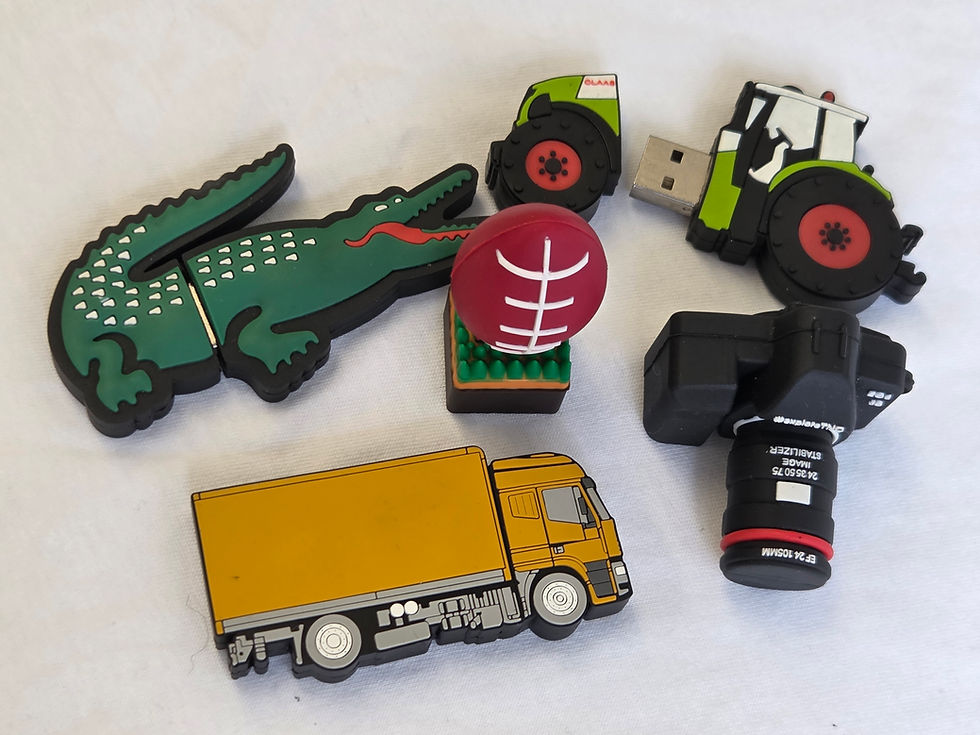
Rubber/Silicone | Flexible, colourful | Youth brands, events |
Custom Shapes | Unique branding | Product launches |
Why Casing Matters for Giveaways
A strong housing ensures your USB:
Doesn’t crack in bags
Survives daily use
Feels valuable to recipients
A premium casing enhances brand perception.
Step 7: Assembly and Final Build
At this stage, all components are assembled into the final USB drive.
This includes:
Inserting the PCB into the casing
Closing and sealing the shell
Adding caps, swivels, keyrings, or lanyards
Most promotional USB drives are designed with portability in mind since they’re often given away at:
Trade shows
Corporate events
University expos
Product launches
Step 8: Testing and Quality Control

This is one of the most important stages for bulk promotional orders.
Testing Includes:
Capacity verification
Speed testing (USB 2.0 vs USB 3.0)
Plug/unplug durability checks.
Data integrity tests
Step 9: Branding
Now comes the stage buyers care about most: your logo.
Promotional USB branding is applied after manufacturing to ensure clean, accurate results.
Common Logo Methods
Branding Method | Best For | Durability |
Pad Printing | Simple logos, bulk orders | Medium |
Laser Engraving | Metal USBs, premium look | High |
Full Colour UV Print | Detailed branding, vibrant colours | High |
Embossing/Debossing | Leather or rubber styles | Medium-High |
Step 10: Packaging
Once branded, USB drives are packed for shipping or event use.
Packaging Options
Individual polybags (budget)
White cardboard boxes
Custom printed gift boxes
Presentation cases
Give Away Something Customers Keep
USB drives are compact, yet their manufacturing process is highly advanced, from semiconductor memory chips to precision logo printing. When you purchase USB drives in bulk for giveaways, you provide customers with a useful, portable, and durable product that keeps your brand visible for years.
At USB Planet, we specialise in high-quality branded USB drives for Australian businesses seeking to make a strong impression with practical promotional products. Contact us today to place your order!


Comments